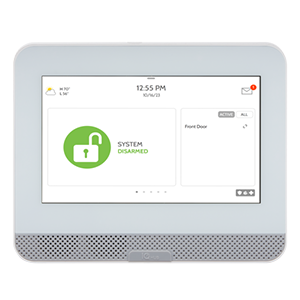
IQ4 Hub
The IQ4 Hub provides similar functionality to the IQ Panel 4, but at a lower cost. Powered by an 8-core processor and sporting lightning-fast LTE and Wi-Fi Dual Path, the IQ4 Hub unifies smart home devices on one beautiful 7” touchscreen to give customers ultimate control over their home’s security.
What can we help you with?
9 Articles
Get started with your Concord 4 panel. Learn how to set up your security system, program user codes, and explore its essential home protection features.
Learn how to easily program and connect a door or window sensor to your Qolsys IQ Panel 2 with our step-by-step guide.
Learn how to add a Z-Wave device to your IQ4 Hub panel. Follow our step-by-step instructions to connect and configure your smart home devices easily.
Learn how to program Wi-Fi on your Qolsys IQ4 Hub. Follow step-by-step instructions to connect your panel to your network at the Brinks Home Help Center.
Learn how to troubleshoot a non-responsive IQ4 Hub panel. Follow simple steps to reboot or power cycle your system and restore normal operation.
Troubleshoot and fix a panel communication failure on your IQ4 Hub. Follow our step-by-step guide to restore connection to your Brinks Home security system.
Learn how to safely replace the backup battery in your Brinks Home IQ4 Hub panel with our easy, step-by-step troubleshooting and installation guide.
Learn how to safely inspect your Simon XTi panel, resolve the physical cause of a cover tamper error, and clear the alert from your home security system.
Troubleshoot and resolve sensor malfunction errors on your IQ4 Hub panel. Follow our step-by-step guide to clear alerts and restore your home security system.