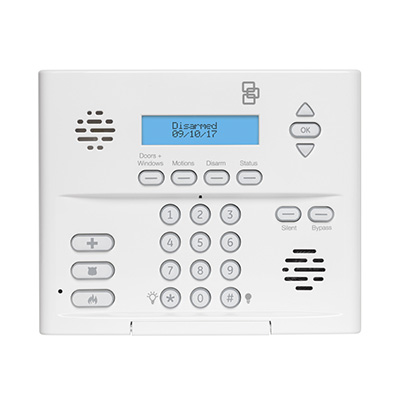
Simon XT
The Simon XT is a wireless all-in-one alarm panel from Interlogix that includes a touch-button keypad for controlling the system. The Simon XT can support up to 40 zones of burglary and fire protection and complies with SIA False Alarm Standards.
What can we help you with?
8 Articles
Get the most out of your 2GIG Edge Panel. Learn how to set up your smart panel, configure wireless zones, and explore advanced security features.
Learn how to program and connect a wireless sensor to your Simon XT security panel with these step-by-step instructions from the Brinks Home Help Center.
Learn how to add a Z-Wave device to your Simon XT security panel. Follow step-by-step instructions to connect smart home devices to your system.
Troubleshoot an unresponsive or frozen Simon XTi panel. Learn how to safely power cycle your Brinks Home system to restore functionality.
Our troubleshooting guide will walk you through getting your panel to reconnect to Wi-Fi.
Get step-by-step instructions to replace the backup battery in your Simon XT panel. Learn how to clear the low battery alert and keep your home secure.
Learn how to fix a tamper error on your Simon XT panel. Follow simple steps to secure the panel cover and clear the alert from your Brinks Home system.
Troubleshoot a sensor malfunction on your 2GIG GC2 or GC2e panel. Follow step-by-step instructions to resolve the error and keep your home security system running smoothly.