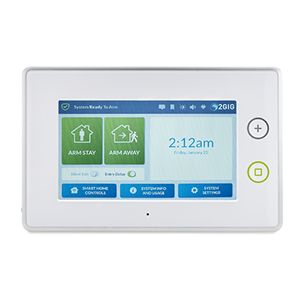
2GIG GC3/GC3E
The GC3 panel is 2GIG’s response to modern home security and features an intuitive 7” capacitive touchscreen with large buttons for ease of use. At a mere 1.25”, the GC3 is one of the thinnest high-quality all-in-one systems on the market.
What can we help you with?
9 Articles
Explore features and setup instructions for your 2GIG GC3 or GC3e security panel. Get step-by-step help with configuration, battery replacement, and more.
Learn how to program a door or window sensor to your 2GIG GC3 GoControl panel. Follow step-by-step instructions to connect your wireless security sensors.
Learn how to add a Z-Wave device to your 2GIG GC3 panel with these step-by-step instructions. Connect smart home devices to your security system easily.
Learn how to connect your 2GIG GC3 security panel to a Wi-Fi network. Follow our step-by-step instructions to program wireless settings and ensure connectivity.
Learn how to troubleshoot and fix a non-responsive 2GIG GC3 security panel. Follow step-by-step instructions to safely reboot or power cycle your system.
Learn how to fix a panel communication failure on your GC3 panel. Follow step-by-step instructions to restore your system connection.
View instructions for replacing the 2GIG GC3 panel's battery.
Learn how to fix a GC3 panel tamper error.
Troubleshoot and resolve a sensor malfunction error on your 2GIG GC3 panel. Find step-by-step instructions to clear alerts and restore your system.